Under $50 Shoot it on a phone Low effort45 min
Light a phone music video with a window and one lamp
A 45-minute lighting setup for a phone music video: window light, a white bounce, one cheap lamp, and locked exposure.

What do you need before you start?
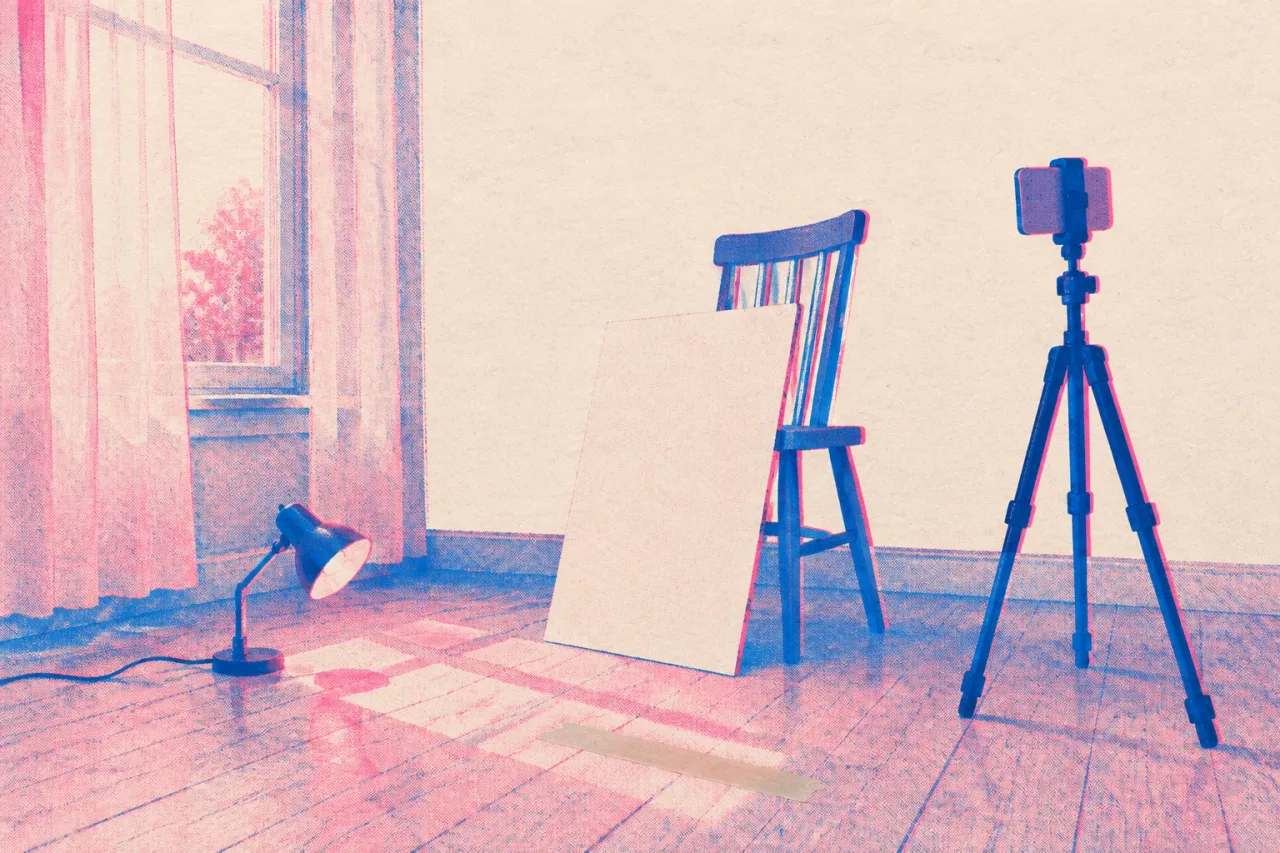
You need a window, a phone, something white to bounce light, one cheap lamp and a way to hold the phone still. A basic lamp and a phone clamp cost less than your $50 budget, and a bedsheet from the closet covers the bounce. Block 45 minutes for lighting and test shots before you film the song.
- A window with daylight coming through, the bigger the better
- A phone on a tripod or clamp
- A white sheet or a sheet of white foam board
- One lamp with a warm or neutral bulb
- Tape or clips to hold the sheet up
Pick the room with the lightest walls. Dark walls soak up the light you are about to work for.
Where should you stand in relation to the window?
Stand side-on to the window, about 3 feet away, so daylight falls across one side of your face. Face the phone and let the window sit at your left or right. This gives your cheek and jaw some shape. Standing with the window behind you turns you into a silhouette, because the phone sets its brightness for the bright glass. Standing square in front of it flattens your face. If direct sun hits you, hang a thin white curtain over the glass or wait for the sun to move. Overcast days work well, since clouds spread the light for free. Put a strip of tape on the floor where your feet go, so you can return to the exact spot.
What is the exact order for setting up?
Set up in this order. It takes about 30 minutes, which leaves 15 for test shots inside the 45-minute block.
- Turn off every overhead light in the room.
- Tape a mark on the floor 3 feet from the window, side-on.
- Hold the sheet or foam board on the far side of the mark, about 2 feet from where you will stand, angled at your face. Clip or tape it to a chair back or the wall.
- Put the phone on the tripod or clamp at eye level, about 5 feet away, held vertical.
- Place the lamp behind you and off to one side, out of frame, aimed at your hair or the wall.
- Record a 10-second test and watch it on the phone.
- Lock exposure and focus, then film.
Step 6 is where problems get fixed cheaply.
Where does the lamp go?
Put the lamp behind you and to one side, aimed at your hair or the wall, never at your face. Its job is to draw a thin bright edge along your hair and shoulder so you separate from the background. Keep it 3 to 5 feet from you and out of the frame. A warm bulb gives a gold edge against the cooler window light. If the edge looks harsh, move the lamp back a foot or point it at the wall instead of at you. A lamp placed in front of you would fight the window and put a second set of shadows on your face. The window lights your face and the lamp draws your outline.
How do you lock exposure and focus?
Press and hold on your face in the camera app until a lock message appears. The wording differs by phone. The lock freezes brightness and focus, so the picture stops pumping when you move your arms or lean toward the lens. After locking, drag the brightness slider down a little if the cheek nearest the window looks white. Check the lock again whenever you reopen the camera, since many phones reset it. Lock from the spot where you will sing, not from where you stood while setting up. Then film a 10-second test and look at your eyes, because soft focus shows there first.
Why shoot at the same time of day?
Film every clip inside the same hour, because daylight shifts in color and strength as the day goes on. A shot from 10 a.m. and a shot from 3 p.m. look like two different rooms once you cut them together. Pick your hour, say 10 to 11 a.m., and shoot the chorus first, since it carries the song. If you need a second day, come back at the same hour and, if you can, in similar weather. Write the time and your phone settings in your notes app. Clouds drift in and out, so film short takes of 20 to 30 seconds and keep the best ones.
What do you do when it goes wrong?
Fix the problem in front of you, then film a fresh 10-second test.
- Face too dark: move a foot closer to the window and bring the board closer to you.
- Shadows too sharp: hang a thin white curtain or sheet over the glass.
- Brightness jumps mid-take: the lock slipped, so reset it and film shorter takes.
If your energy drops, stop after 90 minutes. The light will have moved by then, and tired takes look tired. Come back tomorrow at the same hour. Small brightness differences between clips can be matched later in CapCut or with the color grading tools in DaVinci Resolve.
Which mistakes should you avoid, and how do you make next time easier?
Avoid four mistakes: leaving the overhead lights on, standing with the window behind you, aiming the lamp at your face, and skipping the lock. Overhead lights add a second color of light and throw shadows into your eye sockets, so switching them off is the cheapest fix on this page. To make the next shoot easier, take a phone photo of your finished setup, leave the floor tape where it is, and write down the hour and the lamp distance. You can rebuild the same look from that photo on any later day. Keep the sheet and lamp in one spot, so they are ready when the next single comes out.
Frequently asked questions
Can a window light a whole music video?
Yes, for a performance shot filmed in one room. Add a white sheet or foam board on the dark side of your face to soften the shadows. A cheap lamp behind you adds an edge so you stand out from the wall.
What if my room only has a small window?
Stand closer, about 2 feet away, and film in the brightest hour of the day. Use the board to push light back onto your face. The lamp behind you can light the wall so the background does not go black.
Should I turn off the room lights?
Turn off the overhead lights. They mix a second color of light with the daylight and cast shadows under your eyes and nose. The window and the lamp are all the light you need.
How long does the lighting setup take?
Plan on 45 minutes. About 30 go to placing the window mark, the board, the phone and the lamp, and about 15 go to test shots and adjustments. Film the song after that, inside one hour of the day.
Do I really need to lock exposure and focus?
Yes. Without the lock, the phone keeps changing brightness and focus as you move, and the clip looks like it is breathing. Press and hold on your face until a lock message appears, and check it each time you reopen the camera.